Fries Quest Reference Guide

Adventurer!
A wave of monsters is approaching our castle and I need your help! Any gold you find on the monsters is yours to keep and I have my prized Golden Fries as reward for one special hero. My husband, Lord Neal William Thomas Fries, has great deals in his shop and can help you gear up between battles. Please hurry!
– Lord J Fries

Welcome to Fries Quest
Fries Quest is a Twitch Chat RPG made by JFries exclusively for this channel. Eight players from chat can build and customize characters by defeating waves of monsters and collecting experience points and gold. Even if you are just watching in the audience, you are collecting experience points for your character.
Development started August 10th, 2022 and it was first played on JFries.TV on October 16th, 2022. It has evolved a lot over time as JFries is constantly building on the game in his spare time.
Getting Started & Neal's Deals
When you see the store, it’s your opportunity to join in the battle.
Just type “!join” into the chat window to join in the fun.
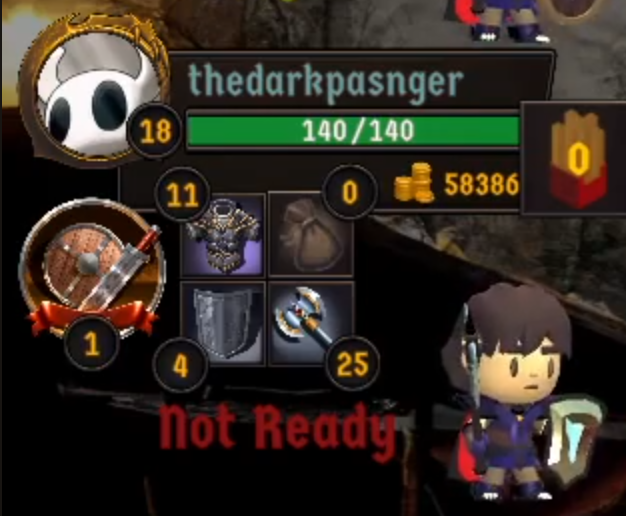
You have 4 inventory slots. However, you only have 1 inventory slot per type and the game will prevent you from buying weaker weapons & armor.
- Upper Left : Armor : The number indicates your Protection due to your armor.
- Upper Right: Potion : The number indicates the max HP that will be healed when your drink your potion during battle.
- Lower Left : Shield : The number indicates additional Protection from your shield.
- Lower Right : Weapon : The number indicates the max damage your weapon can do.
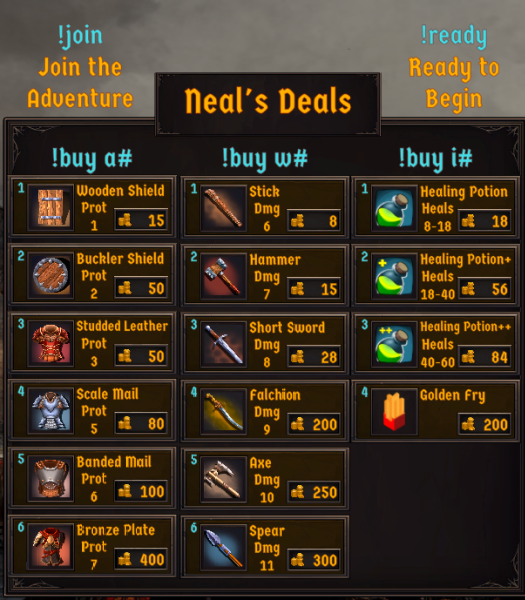
The store is divided into 3 columns: armor & shields, weapons, and items. The armor and weapons change between battles based on what the party has, so always be on the look out for new weapons & armor that might not have been available before. Notice your character’s information bar to see how much gold you have and what you can afford to buy.
To buy armor or a shield, type “!buy a#” where the # is the number of the item you want to buy in the store (1-6).
To buy a weapon, type “!buy w#” where the # is the number of the item you want to buy in the store (1-6).
To buy an item, type “!buy i#” where the # is the number of the item you want to buy in the store (1-4).
- Potions: Potions can be used during battle in order to heal yourself. There are 3 levels of potion.
- Golden Fry: Golden Fries are used to level up. See “Leveling Your Character” section below for more information. You can purchase more than 1 fry by using the command “!buy i4 #” where # is the number of fries you want to buy.

Player Appearance
Your equipment takes on the same color as your Twitch chat color.
Besides that, there’s 2 ways you can customize your character:
- Hair Style: There are 11 types of hair styles. Just type “!hair #” where # is a number between 0 – 10. See below for an image of each hair style.
- Hair Color: You can also customize the hair color by typing “!haircolor color“ where color is one of the following: white, grey, red, pink, blond, green, blue, purple, brown, or black.
- Hair Color (RGB Hex Value): You can also customize the hair color by just typing the RGB hexadecimal value (RRGGBB) after “!haircolor”. For example, “!haircolor FF0000” for red or “!haircolor FFFF00” for yellow; or any color you want.
- Skin Tone: You can customize your characters skin color by typing “!skin tone“ where tone is one of the following: pale, beige, tan, pink, darkbrown, or brown. See below for an image of each skin tone.
- Glasses: Type “!glasses” to toggle glasses on or off your character.
- Beard: Type “!beard #” where # is a number between 0 – 3. 0 is for no beard, 1 is for a short beard, 2 is for a long beard, and 3 is for a extra long beard.
- Beard Color: Type “!beardcolor color” where color is one of the following: white, grey, red, pink, blond, green, blue, purple, brown or black.
- Beard Color (RGB Hex Value): You can also customize the beard color by just typing the RGB hexadecimal value (RRGGBB) after “!beardcolor”. For example, “!beardcolor FF0000” for red or “!beardcolor FFFF00” for yellow; or any color you want.

!hair 0

!hair 1

!hair 2

!hair 3

!hair 4

!hair 5

!hair 6

!hair 7

!hair 8

!hair 9

!hair 10

!skin pale

!skin beige

!skin tan

!skin pink

!skin darkbrown

!skin brown
Ready For Action
You have 2 minutes in order to purchase all of your items and heal if you need to. The time you have left is reflected in the “Battle Begins In” timer in the upper right of the screen.
If you are ready, type “!ready” to mark your character ready for battle. When all players have readied up the timer will go quicker or if the party is completely full (8 players), the battle will begin.
Some players have custom ready audio. This was done as part of a charity stream for donating money during the broadcast. If you would like custom ready audio, look for a future charity stream.
When the time is up on the timer, the store will close and the monsters approach the party!

Battle!
Three waves of monsters are approaching!
Due to the “Twitch Delay” there is a several second of delay in what you are seeing on screen and the game. Therefore, Fries Quest is setup to mainly run itself. The player party and the monsters take turns attacking one another.
Hit Chances & Damage
The chances to hit monsters are dependent on your character’s level and the Protection of the monster. The higher the Protection, the harder it is to hit. In order to get a better chance to hit, you need to level up your character.
Conversely, you will be harder to hit the better your armor and shield is. The Protection of your armor & shield is displayed in your inventory slots or through the “!stats” command.
The amount of damage your character does is determined by your weapon. Check the number next to your weapon in the inventory slot to see the maximum damage your weapon can do.
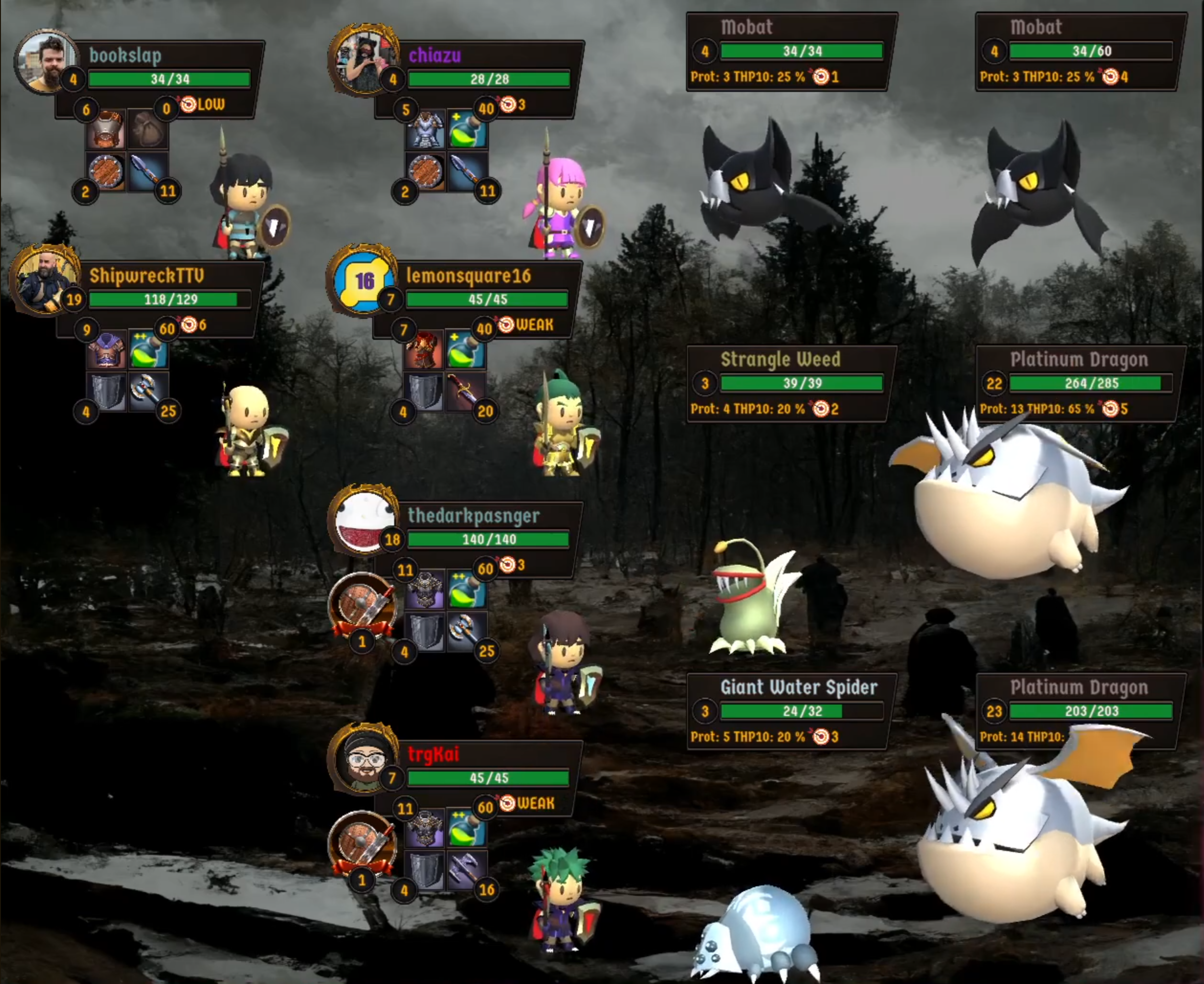
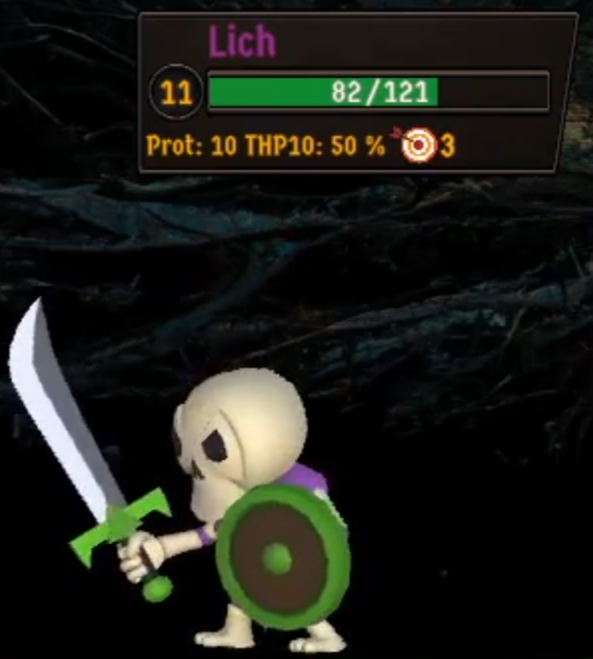
On the monster HUD you will see some stats. “Prot” is the monster’s Protection. Similar to the player’s protection it ranges from 0 – 20. It also shows “THP10”, which is their percentage chance to hit Protection 10. The percentage goes up if your character has less than Protection 10 and the percentage goes down if your character has more than Protection 10. Your protection is the sum of the numbers next to your armor and shield.
Hit Points
The bar in the middle of your character’s and the monsters’ information bar displays the amount of hit points that are left. When the number of hit points reaches 0, your character or the monster will be dead. The bar changes color to help indicate how close to death the character is:
- Green: > 50% of hit points left
- Yellow: > 20% and < 50% hit points left
- Red: < 20% of hit points left
Drinking Potions
Did you remember to buy a potion in the store? If you did, you can replenish some of your hit points during the battle. Just type “!useitem” in chat to drink your potion. If you do this before you die, your character will gain hit points based on the power of the potion you purchased. The maximum number of hit points that can be restored is displayed next to your potion in your inventory.
Targeting Monsters
Another thing you can do in order to help determine the outcome of the battle is to target specific monsters in the battle.
- “!target rand” : Random: This is the default setting for a character. They will attack a random monster.
- “!target high” : High Level : This will have your character target the highest level living monster.
- “!target low” : Low Level : This will have your character target the lowest level living monster.
- “!target strong” : Strongest Health : This will have your character target the current monster with the most hit points.
- “!target weak” : Weakest Health : This will have your character target the current living monster with the least amount of hit points.
- “!target #” : Target a Specific Monster by Number : Each monster is numbered. If you look in the monster’s Information Bar, there is a target icon with a number beside it. When you target a specific monster you get a +5% chance to hit. When the monster dies, your target is reset to random.
Monsters Targeting Players
If you are a lower level character, don’t worry. High level monsters have a higher chance of targeting high level characters. However, look out for those lower level monsters. You might want to target them!
Battle Over
The battle ends when all the monsters or all the players are killed. If all the players are killed, then the game is over. The players are victorious if at least one player lives.
If the party is victorious, the spoils of battle (gold and experience points) will be divided among the living members of the party. Higher level players get more experience points (XP) than lower level players, but gold is divided evenly.
If your character dies, you won’t get any gold, but you will get a small amount of Experience Points.
Are you a subscriber to the JFriesTV Twitch channel? You are in luck! If you are a subscriber before you joined the game, you will get +25% extra gold and experience points. If you die, you will also get a small amount of gold.
Even if you aren’t actively playing and are just watching the broadcast, your character will receive a little bit of experience points! It pays to just lurk and watch Fries Quest even if you don’t have time to play.

Between Battle Healing
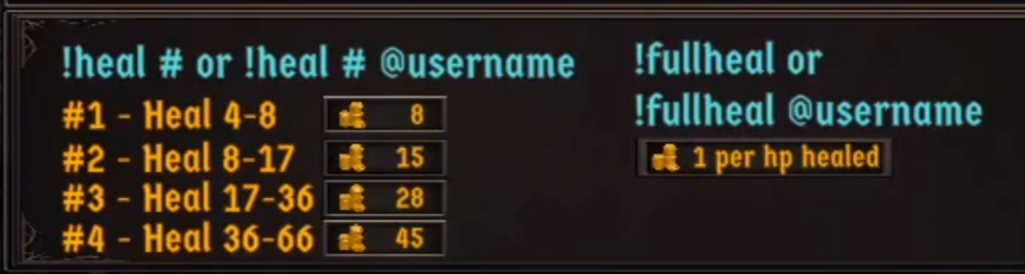
After battles 1 & 2 Neal’s Deals will appear again and this will give you the chance to heal. If your character was killed, they will be automatically resurrected with 1 hit point.
You have 5 options for healing:
- !heal 1 : Heals 4 – 8 hit points
- !heal 2 : Heals 8 – 17 hit points
- !heal 3 : Heals 17 – 36 hit points
- !heal 4 : Heals 36 – 66 hit points
- !fullheal : Heals all of your damage at 1 gold per hit point
You can also heal other people in your party by adding @ and their username at the end of the command. For example, to fully heal your friend JFriesTV, you would type, “!fullheal @JFriesTV”. If this is left off, it’s implied that you are healing yourself.
And the Golden Fry Goes To...
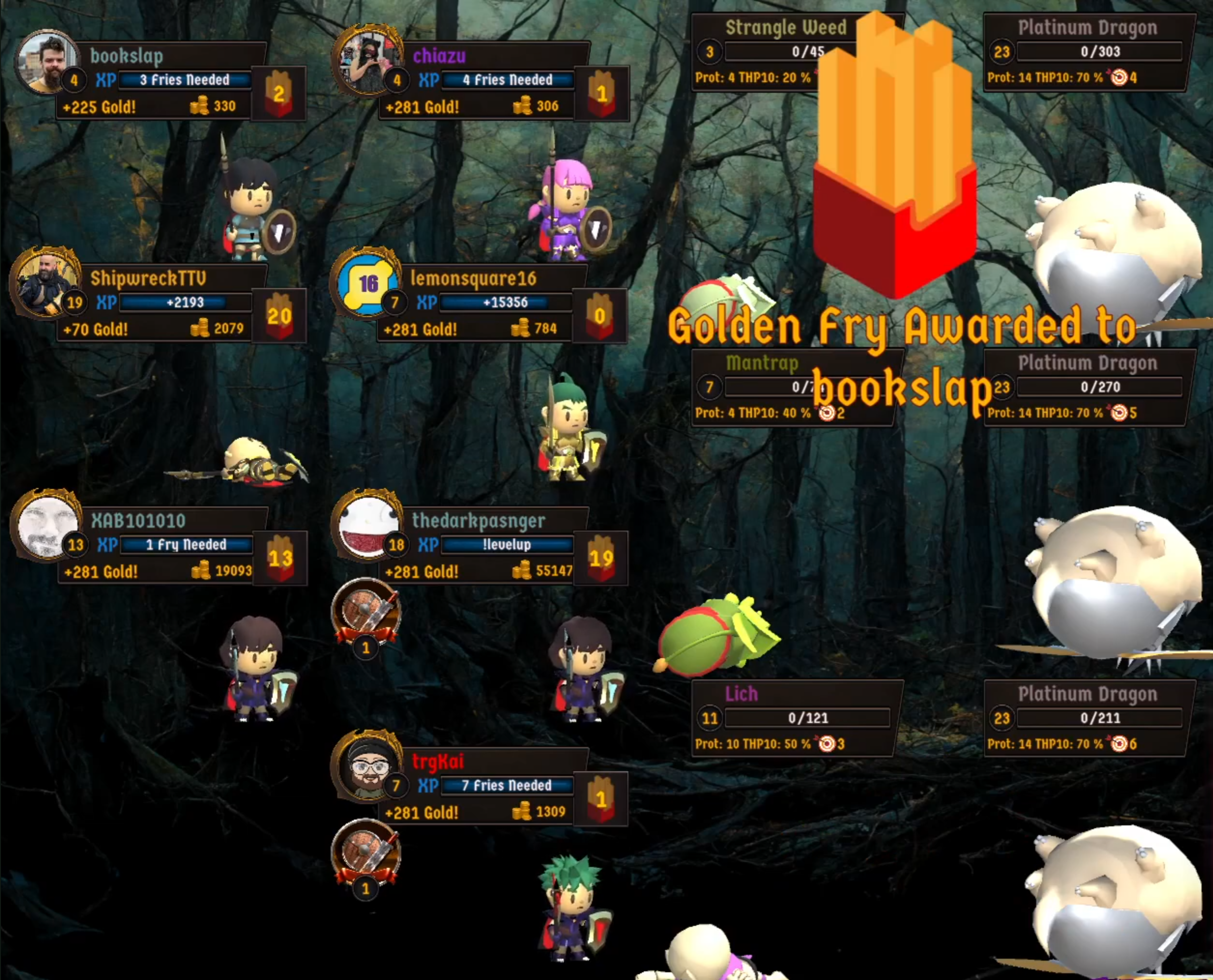
After 3 battles, Lord Fries rewards one of the players with one of his valuable Golden Fries.
So what? What are these Fries used for?
Leveling Your Character
Your character’s level is displayed right next to your profile picture. Once you’ve collected enough experience points (XP), your character is eligible to go to the next level. The higher your character, the more experience points it will take before you can level up. Once you have enough XP for the next level, you will no longer gain any more XP.
In addition to XP, you will also need Golden Fries. You need the number of Golden Fries for the level you need to level up to. For example, if you are leveling up to level 2, you need 2 Fries; for level 3, you need 3 Fries; etc. Fries are rewarded at the end of each game. In addition, you can purchase them in the store.
The blue bar at the end of the battle will indicate if you are ready to Level Up or not. Just type “!levelup” in order to go to the next level. If you don’t have enough XP or Fries, look for a response in chat to see what you need to get to the next level.
When you level up your character, it will be easier to hit monsters who have more protection. In addition, you will get an additional 5 – 10 maximum hit points added to your character.
Prestige Leveling
Once a character reaches level 20, you are eligible to increase your Prestige Level. Once you reach Level 20, you will no longer gain any more Experience Points and you cannot win or purchase any Golden Fries.
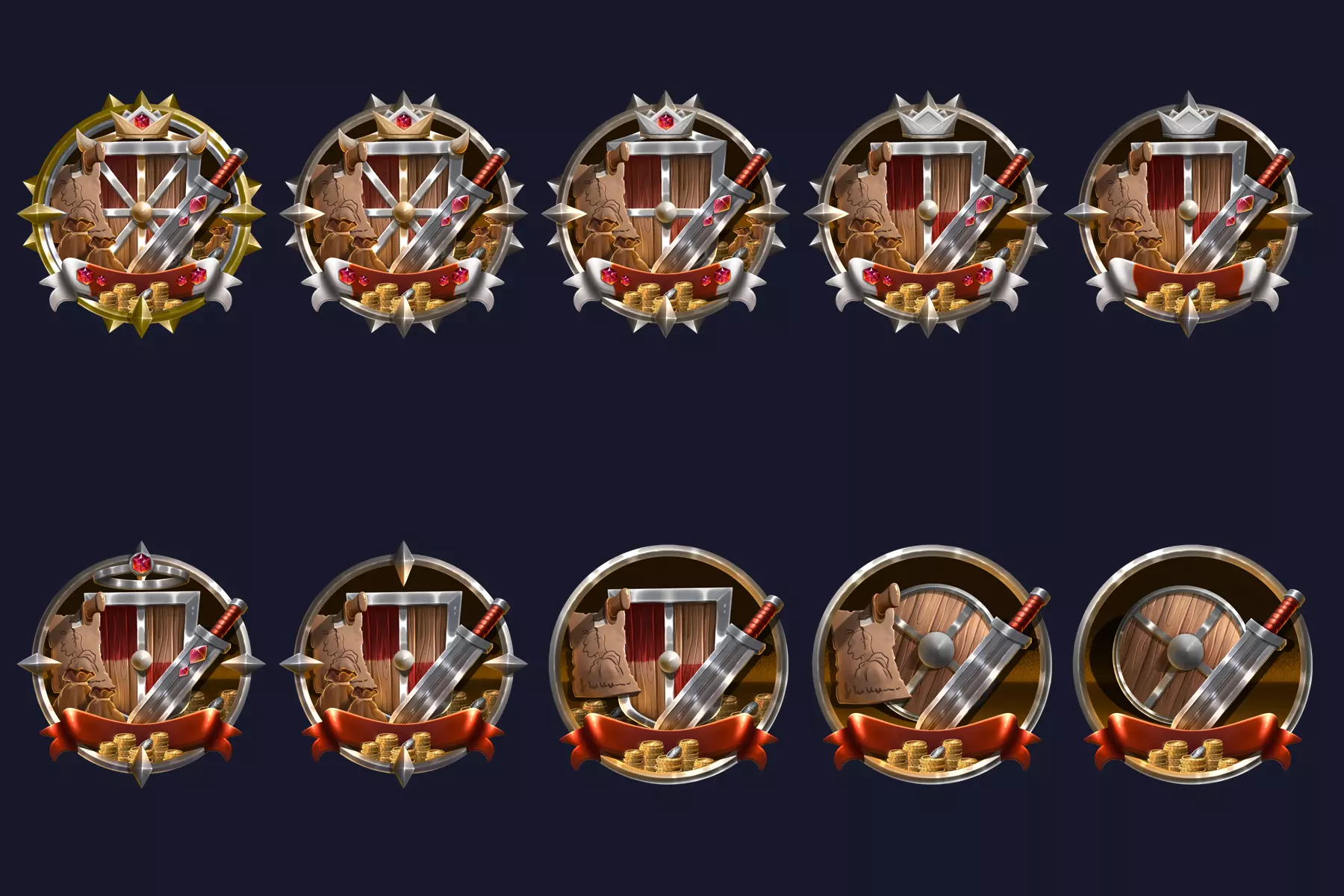
For each Prestige Level you gain, you will get +2.5% to hit and +1 damage. You will get a unique badge to the left of your inventory.
When you Prestige, you are resetting your character back to level 1. You have a choice of what to keep, but everything else will be reset.
- !prestige armor : Prestige your character and keep your current armor.
- !prestige weapon : Prestige your character and keep your current weapon.
- !prestige gold : Prestige your character and keep your current gold.

Player Stats
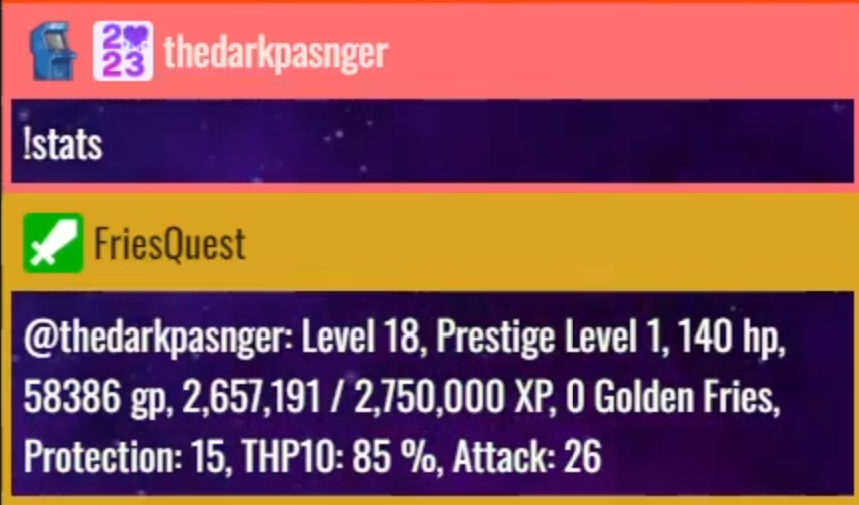
At any time you can use the command “!stats” to check out information about your character.
- Level : Your character’s current level
- Prestige Level : Your character’s current Prestige Level
- hp : The maximum hit points that your character has
- gp : The current amount of gold your character has
- XP : The current amount of Experience Points your characters has / the amount needed to the next level
- Golden Fries : The number of Golden Fries your character has
- Protection : The amount of Protection your character currently has (armor + shield Protection)
- THP10 : The percent chance your character has to hit Protection 10. Chances go up if the monster you are attacking has less than 10 Protection and the chances go down the more Protection it has.
- Attack : The maximum damage your current weapon does.